
BfX
F o r u m
Downloads
Formulas
Drag Functions
Mathematics
VBA Example
Ballistics for Excel
Update December 6, 2025: The download system has been fixed. Downloading files is fully operational again.
January 2024 -
recompilation with latest compilers
BfX allows shooters familiar with Excel to create customized calculations, graphs and tables. With BfX, Excel becomes a great way to calculate rifle settings, to calibrate a scope or iron sights, to explore trajectories, to study the effects of wind even if it varies in magnitude and direction along the bullets path. Metric and imperial units can be used, help is at hand, BfX is accurate and fast.
BfX works probably with all Excel and Windows versions. BfX is deployed as a regular Excel add-in (dynamic link library). Excel add-ins add new functions to Excel—and with just dragging and linking cells you create your tables and graphs—ballistics as you need it!
What others say ...
In January 2011 the South Australian F-Class Association wrote about BfX and created a bullet comparator ("I ... didn't get a headache or even raise a sweat"). In Februari 2011 they published an interview. Helas non of it can be found on the Internet anymore.On january 2019 I got a flattering message from and Australian shooter also active on ozfclass.com from which I quote:
I am a long term user of your software to assist with my F-Class shooting. It is an excellent system and a great idea to allow people with Excel skills to integrate accurate G7 based ballistics calculations into workbooks created to suit their own circumstances. The main use I have had is in an application used to make plot sheets for every shoot I do. An important part of it is to calculate scope sight settings and wind deflections. Because I use many combinations of scope sights, barrels, loads etc. I keep thorough records (in the same workbook) of all the required inputs to BfX. I have used this application extensively at competitions up to and including World Championships, so thank you Robert.

The
creator of BfX at the Dutch 300m prone rifle
championships in 2008, read
more ...
Via the Forum (membership required)
or use
=Bfx_Info(-2)
in Excel to retrieve an email address
Example
The following example shows the ease of use of BfX.The formula entered calculates the trajectory heigth for a bullet with a muzzle velocity of 740 m/s, and which is shot with a rifle having a front sight heigth of 3,4 cm. The impact is at 0 cm above the point at aim at 300 m. The path heigth at 200 yards is calculated. The ballistic coeficient entered is 0,23 lbs/inch2 and the G7 drag function is used. The result is 0,24 m. If no units are given, BfX expects metric ones as input (except for the ballistic coeficient). Outputs are by default also metric, and can be easily converted to other units, by just specifying the desired unit as the first parameter.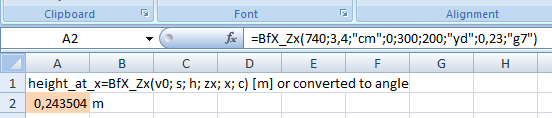
Row 1 shows the BfX feature get instant help on a function, here BfX_Zx, and row 2 shows the result. Note that this is a typical European notation for Excel input, elsewhere you may have to type =BfX_Zx(740,3.4,"cm",0,300,200,"yd",0.23,"g7"). Read more about entering formulas here ...
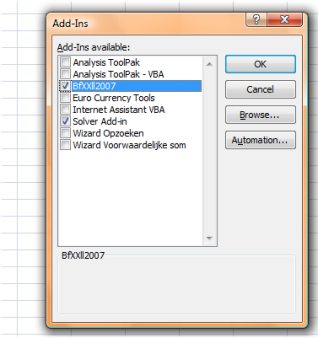 |
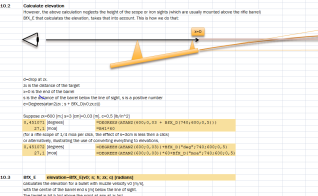 BfX appears as a set of Excel functions (top). BfX is programmed in C++ and is loaded in Excel as an add-in (left). Visit the download page for Excel workbooks that teach you using BfX and how to use BfX in Visual Basic for Applications (VBA). |
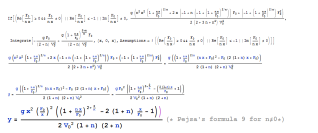
The physics behind BfX is carefully derived, the software is cross checked, read more...
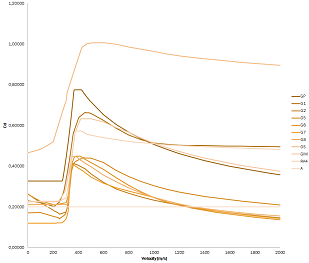
BfX supports various drag functions, including G7 and one for air rifles , you even can supply your own !!!, read more...
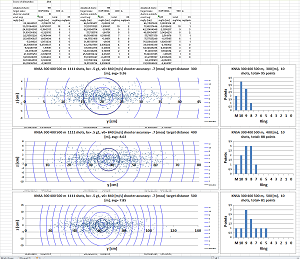
BfX can be used in VBA programs with which quite complicated applications can be build. Here an example of a multi distance match simulator.
Warning.
The use of BfX is entirely your responsibility. It is free to use in
private and non-commercially — and it comes without
any
guarantee.